Pages

Search This Website

Showing posts with label Google. Show all posts

Friday, 25 February 2022

Read Along ( Bolo ) : Learn to Read With Google

Have fun as you learn to read English & more with the magic of your voice

Read Along (formerly Bolo) is a free and fun speech based reading tutor app designed for children aged 5 and above.


It helps them improve their reading skills in English and many other languages (Hindi, Bangla, Marathi, Tamil, Telugu, Urdu, Spanish & Portuguese) by encouraging them to read aloud interesting stories and collect stars and badges together with "Diya", the friendly in app assistant.

Diya listens to children when they read and offers realtime positive feedback when they read well and helps them out when they get stuck - even when offline & without data!


ગુજરાતી પ્રેકટીસ પેપર PDF

ગણિત સ્ટાન્ડર્ડ પ્રેકટીસ પેપર PDF

ગણિત બેઝીક પ્રેકટીસ પેપર PDF

હિન્દી પ્રેકટીસ પેપર PDF

સામાજીક વિજ્ઞાન પ્રેકટીસ પેપર PDF

અંગ્રેજી પ્રેકટીસ પેપર PDF

સંસ્કૃત પ્રેકટીસ પેપર PDF

વિજ્ઞાન પ્રેકટીસ પેપર PDF

Features: 


Works Offline : Once downloaded, it works offline, so it does not use any data.
Safe : Since the app is made for children, there are no ads, and all sensitive information stays only on the device.
Free: The app is completly free to use and has a vast library of books with different reading levels from Pratham Books, Katha Kids & Chhota Bheem, with new books added regularly.
Games: Educational games within the app, make the learning experience fun.
In-App Reading Assistant: Diya, the in-app reading assistant helps children read out loud and provides positive reinforcement when they read correctly, and help wherever they get stuck.
Multi Child Profile: Multiple children can use the same app and create their individual profiles to track their own progress.
Personalised: The app recommends the right level of difficulty books to each child depending on their reading level.

વાંચન માટેની google ની એપ અહીંથી ડાઉનલોડ કરો

કોડ કઈ રિતે ઉમેરવો તેનો વિડીયો અહીથી જુઓ

Languages available :
With Read Along, children can read a variety of fun and engaging stories in different languages including:
• English
• Hindi (हिंदी)
• Bangla (বাংলা)
• Urdu (اردو)
• Telugu (తెలుగు)
• Marathi (मराठी)
• Tamil (தமிழ்)
• Spanish (Español)
• Portuguese (Português)

With just 10 minutes of fun & practice every day, inspire your child to become a reading star for life!

Read More »

Sunday, 21 November 2021

Best app by google, Google Photos App Info


Best app by google, Google Photos App Info

  • App Download Version : 5.39.0.369251544
  • Last Updated : Apr 28, 2021
  • Apk Size : Varies with device
  • App by : Google LLC
  • Category : photo app
  • Content Rating : Everyone
  • Support Android Version : Android 21 and above
  • Get it on : Google Play


About Google Photos app :

Google Photos apk content rating is Everyone and can be downloaded and installed on android devices supporting 21 api and above.

Best app by google, Google Photos App Info

Google Photos is the home for all your photos and videos, automatically organized and easy to share.

  • “The best photo product on Earth” – The Verge
  • “Google Photos is your new essential picture app” – Wired

The official Google Photos app is made for the way you take photos today and includes essential features like shared albums, automatic creations and an advanced editing suite. Additionally every Google Account comes with 15 GB of free storage and you can choose to automatically back up all your photos and videos in High quality or Original quality. You can then access them from any connected device and on photos.google.com.


Google Photos માં hide ઓપ્શનનો ઉપયોગ કેમ કરવો તેનો વિડીયો


Get Official Apps Google Photos :

  • FREE STORAGE : Back up 15 GB of photos and videos for free and access them from any device and photos.google.com—your photos are safe, secure, and private to you. All photos and videos you back up in High quality before June 1, 2021 will not count toward your Google Account storage.
  • FREE UP SPACE: Never worry about running out of space on your phone again. Photos that are safely backed up can be removed from your device's storage in just a tap. 
  • SMART AUTOMATIC ALBUMS: Automatically get a new album with just your best shots after an event or trip, then invite others to add their photos.
  • AUTOMATIC CREATIONS: Bring photos to life with automatically created movies, collages, animations, panoramas, and more from your photos. Or easily create them yourself.
  • ADVANCED EDITING SUITE: Transform photos with a tap. Use intuitive and powerful photo editing tools to apply content-aware filters, adjust lighting, and more.
  • SHARING SUGGESTIONS: With smart sharing suggestions, giving your friends the photos you took of them is painless. And they can add their photos, too, so you’ll finally get the photos you’re actually in.
  • FAST AND POWERFUL SEARCH: Your photos are now searchable by the people, places and things in them — no tagging required.
  • LIVE ALBUMS: Select the people and pets you want to see and Google Photos will automatically add photos of them as you take them, no manual updates needed.
  • PHOTO BOOKS: Create a photo book in just minutes from your phone or computer. You can also see suggested photo books based on your best shots from a trip or period of time.
  • GOOGLE LENS: Search the hard-to-describe and get stuff done, right from a photo. Copy and translate text, identify plants and animals, add events to your calendar, find products online, and more.
  • SEND PHOTOS IN SECONDS: Instantly share photos with any contact, email, or phone number.
  • SHARED LIBRARIES: Grant a trusted person access to all of your photos.


You can also upgrade storage for your Google Account, used for Original Quality photos and videos by subscribing to Google One. Subscriptions start at $1.99/month for 100 GB in the US. Pricing and availability can vary by region

Read More »

Monday, 18 October 2021

how to add your business on google maps

When you add a enterprise to Google, it can assist carry in new clients and streams of revenue.

You can personalize your Google Business web page with hours, photos, services, and more.

When you add a place or provider region for your business, it will become searchable on Google Maps.

Adding your enterprise to Google - whether or not it is a restaurant open to the public or a hair salon run out of your domestic - is an necessary step to attain customers, make connections, and in the end develop a profitable business.


It additionally offers your enterprise an air of legitimacy, and makes it searchable by way of Google Maps.


Here's how to add your commercial enterprise to Google, and customise your enterprise page.


How to add a commercial enterprise to Google

Note that the specific sequence of steps may additionally fluctuate relying on which choices you make on every page, and what variety of enterprise web page you are creating.


1. Go to Google's My Business

Go to Google's My Business web page https://www.google.com/business/ and log into your commercial enterprise account. Or, create a Google account for your commercial enterprise through touring the Google sign-in web page and deciding on Create account.


2. Search Your Business 

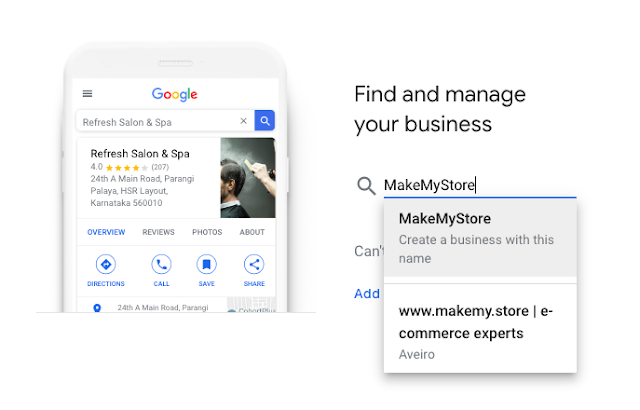
From the My Business homepage, click on Manage now and on the subsequent screen, enter your business' title into the search bar. In the drop-down underneath the search bar, pick Create a enterprise with this name. Read also: Top 10 Best Travel & Tourism Companies in India - 2021

how to add your business on google maps www.techmexo.com


Note: If your commercial enterprise identify and tackle seems in the drop-down already, that ability your enterprise has already been listed and you may want to declare it as your very own - if it truly is the case, pick out this choice and comply with the prompts to declare your business.


3. Enter Your Business Title

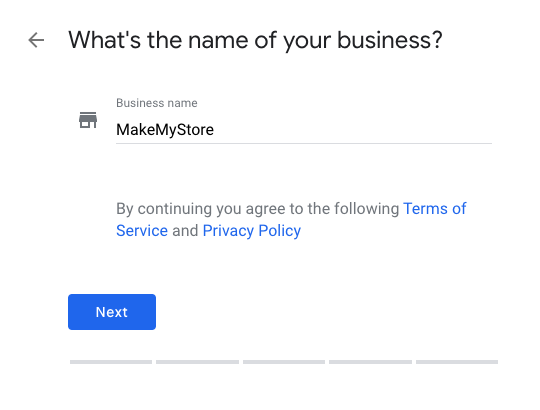
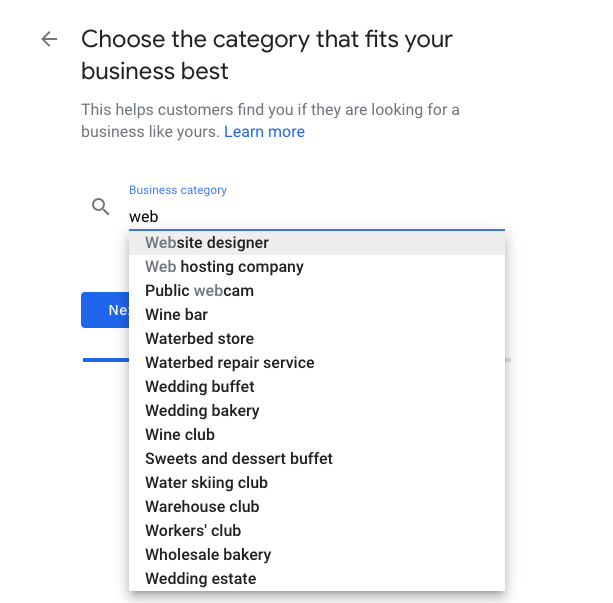
On the subsequent page, enter your Business title and Business class (such as restaurant, retail, barber shop, etc.). Then, pick out Next. You'll be capable to add extra classes later on.

how to add your business on google maps www.techmexo.com


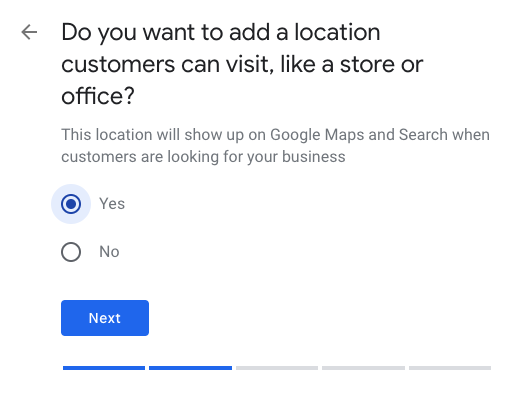
4.Select Your Business Area

Next you may want to pick out whether or not you desire your business' area to show up on Google Maps. If you are including a restaurant or different commercial enterprise it truly is open to the public, being on Google Maps is relatively useful. But if you are simply including a small commercial enterprise run out of your house, preserving that region personal may be a right idea. Select Yes or No and hit Next. Read also: Mahindra Finance launches "Shubh Utsav"Two month unique festive Offers on Vehicles loans.

how to add your business on google maps www.techmexo.com


5. Fill out the applicable records

If you selected to add your commercial enterprise to Google Maps, the subsequent display will ask you to enter your commercial enterprise address. If you selected to maintain your specific vicinity private, then the subsequent display will ask you to enter your carrier area(s). Fill out the applicable records and choose Next.

how to add your business on google maps www.techmexo.com


6. Enter internet site

Enter the smartphone variety and internet site related with your commercial enterprise and click on Next.

how to add your business on google maps www.techmexo.com

This is an important option, as businesses that don't have a physical location won't show up in Google Maps. Read Also: Best 10 Hotel Booking App In India 2021

how to add your business on google maps www.techmexo.com

Quick tip: If you do not already have a website, you can pick out Get a free internet site based totally on your data to have Google mechanically create a internet site for you.


7. Google Business to ship you updates

On the subsequent page, select whether or not or now not you favor Google Business to ship you updates and hints for your business, and hit Next.

how to add your business on google maps www.techmexo.com


8. Enter your tackle

If you selected no longer to grant a commercial enterprise address, you may want to enter your non-public mailing tackle to confirm your business. This tackle will now not be seen to the public. Enter your tackle and hit Next, or pick out Verify later.


You can then add the locations that you serve, at a city, state, or country level.

how to add your business on google maps www.techmexo.com


9. pick out a technique to confirm your business 

Click the drop-down to pick out a technique to confirm your business. Depending on your kind of business, solely some verification strategies may additionally be handy to you. For example, you may also see Postcard by means of mail listed as the solely accessible method. Read also: Real-time GPS navigation & local suggestions for food, events, & activities


Here are all the approaches that you can confirm your identification to Google:


By mail. Google will ship a bodily postcard that consists of a verification pin, which you will then use to confirm online.


By phone. Google will name you, and supply a verification code over the phone. This is solely reachable for sure businesses.


By email. Google will ship you the code over email. Again, this is solely on hand for positive businesses.


Bulk verification. If your enterprise has over 10 locations, you will have to put up an greater shape to have them all proven at once. To do this, when you click on "Get verified," click on "Chain" afterwards and enter all your info. Google will then take up to a week to procedure the request.


Instantly. If you have a Google Search Console account, and your business' internet site is established thru Search Console, you can affirm your account instantly. Some enterprise classes don't seem to be allowed to do this.


10. set up your Google My Business page

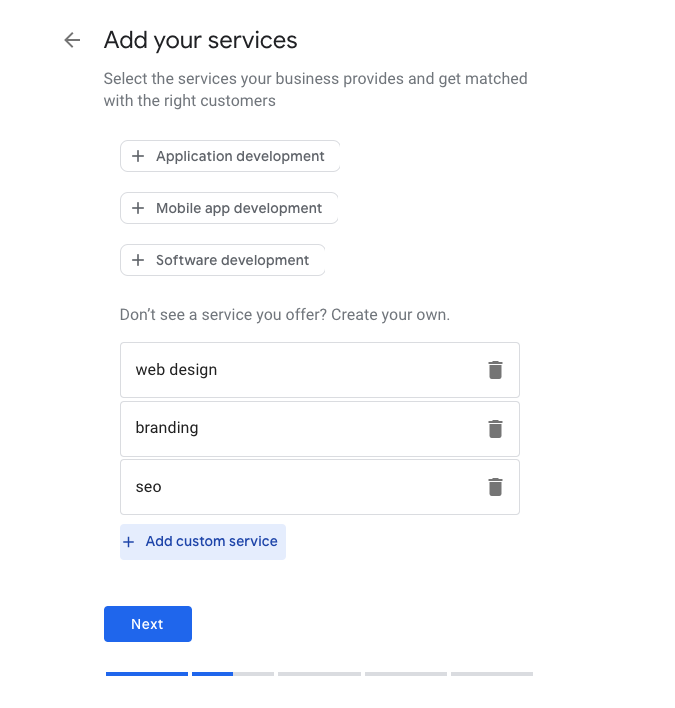
Next, you may be taken via a sequence of prompts to set up your Google My Business page. You can add your offerings and commercial enterprise hours, set messaging permissions, write a enterprise description, add photos, and declare a $100 marketing savings via Google Ads.

how to add your business on google maps www.techmexo.com


11. You can add extra information

Once you have entered all the integral records to set up your business, you will be taken to your Google My Business account web page the place you can add extra information, like a commercial enterprise emblem and co-managers.

how to add your business on google maps www.techmexo.com

12. Google My Business Dashboard

Once you have performed your list you will have get admission to to your Google My Business dashboard. From right here you can replace your commercial enterprise details, add opening hours, images/photos, your enterprise description, any sub-categories that your commercial enterprise falls into and a good deal more.

how to add your business on google maps www.techmexo.com


13. How to affirm your Google My Business account

You ought to affirm your Google My Business account in order to good control it, which can be carried out through getting into a code that will be despatched to the enterprise tackle in a postcard.

how to add your business on google maps www.techmexo.com


14. The quit result

Once your account is up and going for walks you will acquire a affirmation email. Your clients can now locate your commercial enterprise throughout Google.

how to add your business on google maps www.techmexo.com


15. Bonus Step: Bing Places

To similarly make bigger your visibility you can import your Google My Business important points into Bing Places. This is Bing's equal to Google My Business, permitting your enterprise to exhibit up in Bing Maps as nicely as Bing's neighborhood search results.

how to add your business on google maps www.techmexo.com


You can additionally sync your Bing Places account to make sure any modifications made to your Google My Business checklist are additionally up to date in Bing. 

how to add your business on google maps www.techmexo.com


Read More »

Wednesday, 10 February 2021

Real-time GPS navigation & local suggestions for food, events, & activities

Real-time GPS navigation & local suggestions for food, events, & activities

Real-time GPS navigation & local suggestions for food, events, & activities

Navigate your world faster and easier with Google Maps. Over 220 countries and territories mapped and many many businesses and places on the map. Get real-time GPS navigation, traffic, and transit info, and explore local neighborhoods by knowing where to eat, drink and go - regardless of what a part of the planet you’re in.

Get there faster with real-time updates

• Beat traffic with real-time ETAs and traffic conditions

• Catch your bus, train, or ride-share with real-time transit info

• Save time with automatic rerouting supported live traffic, incidents, and road closures

Real-time GPS navigation & local suggestions for food, events, & activities


Discover places and explore sort of a local

• Discover local restaurant, events, and activities that interest you

• Know what’s trending and new places that are opening within the areas you care about

• Decide more confidently with “Your match,” variety on how likely you're to love an area 

• Group planning made easy. Share a shortlist of options and choose real-time

• Create lists of your favorite places and share with friends

• Follow must-try places recommended by local experts, Google, and publishers

• Review places you’ve visited. Add photos, missing roads and places.


Get Google Map From Here


More experiences on Google Maps

• Offline maps to look and navigate without an online connection

• Street View and indoor imagery for restaurants, shops, museums and more

• Indoor maps to quickly find your way inside big places like airports, malls and stadiums

* Some features not available altogether countries

* Navigation isn't intended to be employed by oversized or emergency vehicles

Read More »